
Your entrance tells everyone what's happening in the building today
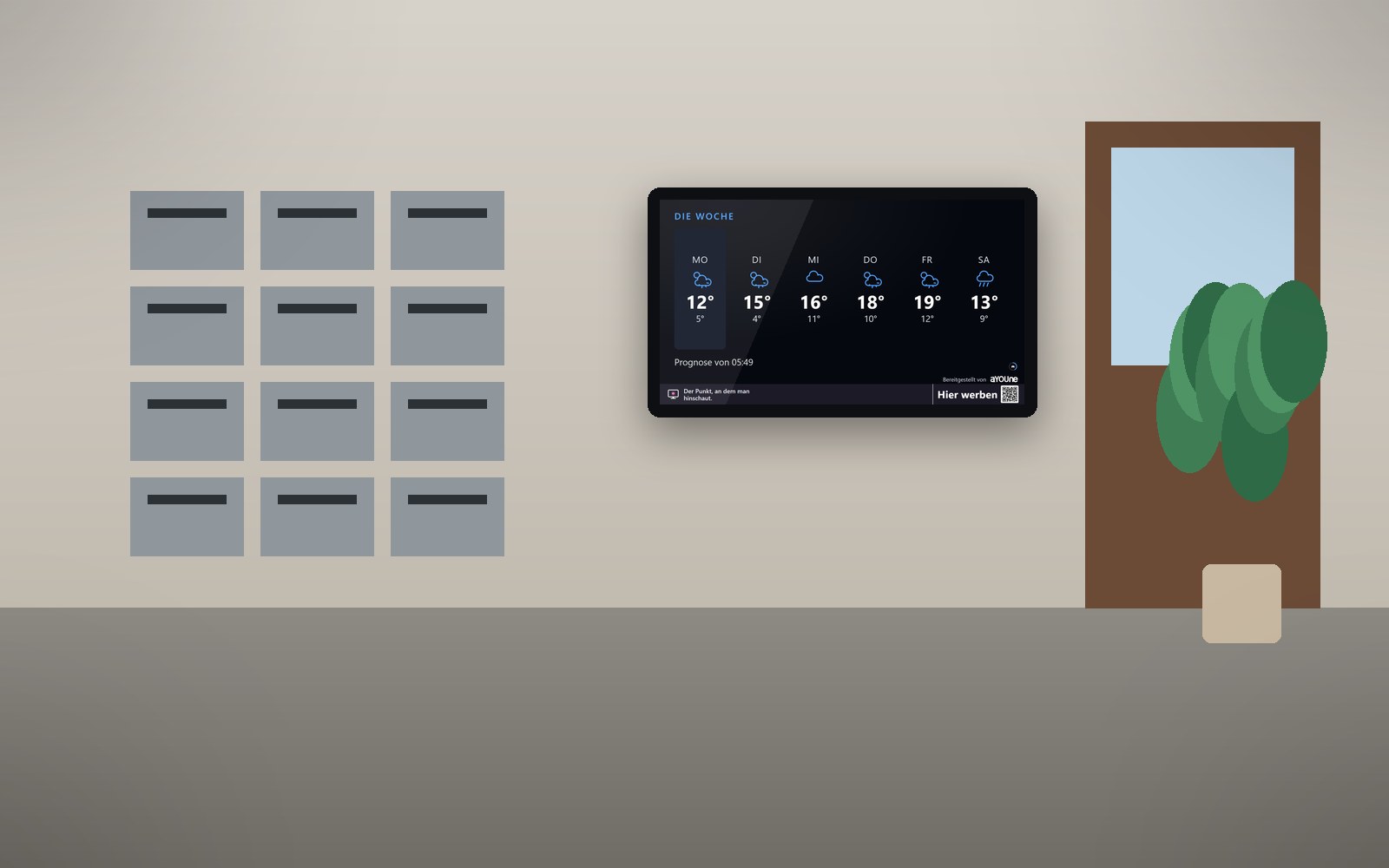
A bright screen in the entrance or lobby shows lift maintenance, meter-reading dates and the management's office hours, plus weather, official warnings and what's on nearby. It keeps itself up to date, and you steer it from your phone.
The notice board has had its day
In the entrance hall there's a board covered in overlapping notes: the lift maintenance announcement, the house rules, a note from the caretaker, last year's invitation to the owners' meeting. People heading to work glance at it and can't spot what's new. In an office building it's much the same, except that visitors, tenants and couriers pass through the lobby all at once.
For the property manager this means printing notices, driving over, pinning them up and taking them down again later. And still the phone rings because someone missed the meter reading or didn't know the lift in building B would be out of service all morning. Across many properties it turns into a tour of the whole town. Good news, such as a flat coming free, a parking space in the underground garage or the community room for parties, often gets lost along the way.
schaupunkt replaces the board with a screen that keeps itself current. You add dates in the building, office hours for the management and caretaker and laundry room times in the app, for one building or every property at once. Weather, official warnings and local events are added automatically. What matters today appears exactly where everyone walks past anyway.
What it looks like at your place

In the entrance in the morning
A resident collects her post and sees on the screen that the heating meters are read today and the lift is being serviced until ten. Next to it, the day's weather outlook.

In the office building lobby
Visitors and tenants pass through the lobby. The screen shows dates in the building, the facility management's office hours and the lunch offer from the café next door.

The property management window in the evening
At dusk, the ground-floor property management office is closed. The bright screen in the window shows the vacant three-room flat and the parking space, and passers-by scan the QR code.
Live demo
This is how this sector’s screen is running right now. Pages change on their own.
Live: real data, not a recording.
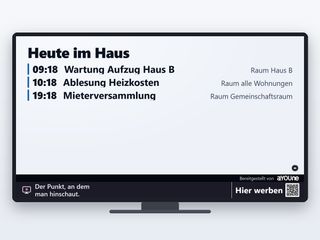
Today in the buildingLift maintenance, heating meter reading, tenants' meeting: the day's dates with time and place in the building. Anyone who sees it in the morning can plan for it. 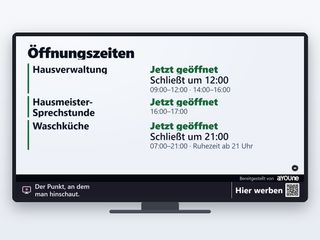
Office hours and building timesProperty management, the caretaker's office hours and the laundry room with their times, quiet hours included. It saves a lot of phone calls. 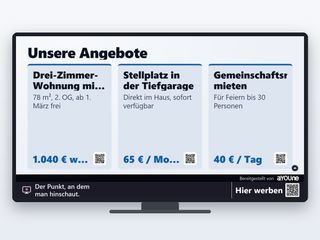
Available in the buildingThe flat coming free, the underground parking space, the community room for parties: each offer with a QR code that leads straight to an enquiry. 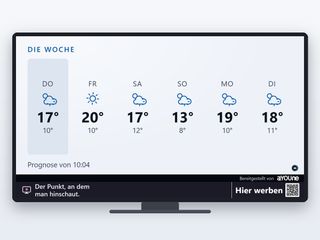
Weather for the weekThe outlook for the coming days at the building's location. A reason to glance over every morning, and to read the building's dates while you're at it.

Watch it on your own TV
Scan with your phone, or type the address into the browser of your TV.
schaupunkt.de/screen/schaupunkt-demo-wohnenThe pages running in your window
Real captures from this sector’s live demo.

Today in the building
Lift maintenance, heating meter reading, tenants' meeting: the day's dates with time and place in the building. Anyone who sees it in the morning can plan for it.

Office hours and building times
Property management, the caretaker's office hours and the laundry room with their times, quiet hours included. It saves a lot of phone calls.

Available in the building
The flat coming free, the underground parking space, the community room for parties: each offer with a QR code that leads straight to an enquiry.

Weather for the week
The outlook for the coming days at the building's location. A reason to glance over every morning, and to read the building's dates while you're at it.
Official warnings
Gales, heavy rain, ice: warnings from the German Weather Service for the district as soon as they apply. Residents bring in their balcony plants and close the skylights in good time.
What's on nearby
Events over the next few days in the neighbourhood and the region, with a QR code for more. The entrance becomes a small piece of the neighbourhood.
A day in the entrance
- 6:45 am: The first residents leave for work. The screen shows the temperature, an ice warning and a note that the heating meters are read today.
- 8:00 am: The lift in building B is being serviced. Anyone who needs it saw the notice in the entrance last night and planned around it.
- 11:00 am: A parking space comes free at the management office. You add it in the app, and it runs straight away in all three buildings of the estate.
- 4:00 pm: The caretaker's office hour begins. The screen shows it, and questions arrive together rather than one by one all day.
- 6:30 pm: Residents come home. Between the weather outlook and the neighbourhood festival at the weekend, there's the invitation to the tenants' meeting in the community room.
Advertising that suits the building
Owners and management decide whether and which ads run in the entrance. People who walk through the building every day are customers for neighbourhood businesses: the bakery on the corner, the delivery service, the dry cleaner, the decorator, the physiotherapy practice on the ground floor, and in office buildings the café with a lunch menu or the gym. You approve every ad yourself and choose which buildings show advertising.
You share in the revenue. Your share depends on the location, the screen and who provides the device. We lay out the terms openly and discuss them with you in person before the first advertiser goes live. More under Earn with your window. Businesses that want to advertise in your buildings go to Book advertising.
Proof of when each notice ran
Every display is logged with time and screen. If someone asks whether the meter reading was announced, you can look up when the notice ran in which building. Advertisers see the same for their ads. Since 12 September 2026 more than 80,000 displays have been recorded this way.
For a street-facing management office window or an office lobby with lots of footfall there's optional people counting for an extra €15 a month. A small sensor inside on the screen counts people and vehicles with direction and time. It recognises nobody and stores no images, and only hourly figures reach the platform. That produces media data for neighbourhood advertisers. Details on the Sensors page.
Frequently asked questions
The screen shows dates and notices meant for everyone. Residents' names and flat details that identify a person stay off a screen that others can see.
Wherever escape and rescue routes stay clear and no safety sign is covered. We choose the spot with you from a photo.
Yes. Each screen belongs to one building. From the app you send a notice to one building, an estate or your whole portfolio.
The same as in any property ad: prices according to the German price indication rules and the mandatory energy certificate details. Your offer shows them just as you would in a listing.
The owners and the management. You decide per building whether and which ads run, and approve every ad yourself.
Power and internet, and Wi-Fi is enough. You enter the Wi-Fi on first start through a setup page on your phone.
No. Every page works without sound, so the stairwell stays quiet.
The screen programme for an existing screen costs from €12 a month, or from €47 a month complete with device. Footfall counting adds €15 a month. All prices net. When neighbourhood ads run, you share in the revenue.
As a rule, no. The player restarts on its own, and updates arrive over the network.
Dates and offers you maintain on the platform can go onto the screen without entering them twice. Everything else you add in the app.
Related
- Operation and appPair by QR code, steer by phone, for every building.
- Neighbourhood contentWeather, warnings and events, always up to date.
- Legal notesFrom escape routes to data protection: what we look out for at setup.
- Earn with your windowNeighbourhood advertising, and you share in the revenue.
- HotelsScreens for lobby and reception.
- HealthcareScreens for waiting rooms in practices and pharmacies.
Would a screen fit your entrance?
Send us a photo of your entrance or lobby and tell us about your properties. We will tell you what would run there and what each building costs.
Register a location